If you are installing our Plugin via the CCX file and you see a message like this: "The document “name.ccx” could not be opened. Creative Cloud cannot open files of this type." It's not a plugin issue but your system mapping issue.
First step:
Download again the plugin so you are double sure the download is not corrupted.
Second step (most important):
Be sure when you right click on the .CCX file and you go on the menu:"Open as", the destination is as in the image attached below: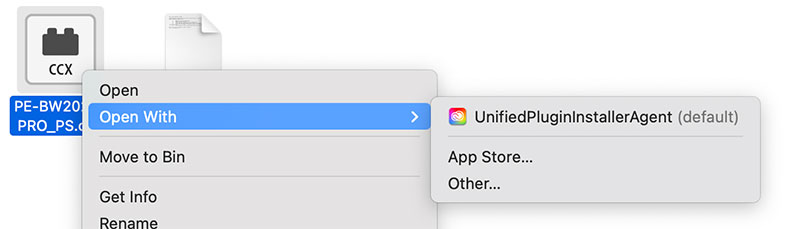
If it's not, this means that your system has a native wrong setup and you need to click on "Other..." and mmap the UnifiedPluginInstallerAgent.app (on Mac) or UnifiedPluginInstallerAgent.exe (on Windows).
Once done, it will work.
Was this article helpful?
That’s Great!
Thank you for your feedback
Sorry! We couldn't be helpful
Thank you for your feedback
Feedback sent
We appreciate your effort and will try to fix the article